3D Birdhouse: A Practical Guide to Laser Cutting Success
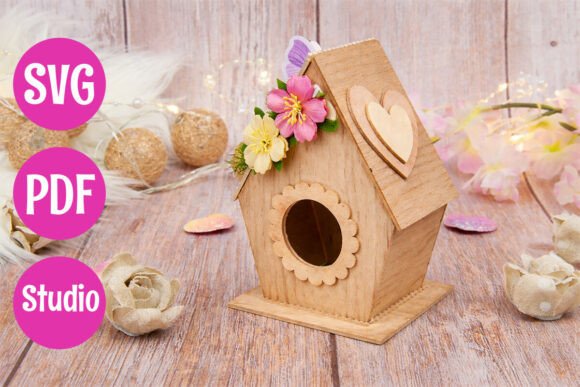
There is a distinct satisfaction in transforming flat sheets of wood into a three-dimensional structure that brings life to your garden. The 3D Birdhouse design represents more than just a pattern; it is a bridge between digital creativity and tangible craftsmanship. For hobbyists using Glowforge or xTool machines, and for crafters utilizing Silhouette Studio, this layered bird house design offers a clean structure and precise pieces ideal for assembling a sturdy and decorative home for local wildlife. However, the gap between downloading a file and holding a finished product is often filled with small errors that can compromise the final result.
Many creators approach these projects with enthusiasm but overlook the technical nuances required for a professional finish. Understanding the specific requirements of the 3D Birdhouse template before you begin cutting is the single most effective way to ensure efficiency and quality. This guide will walk you through common pitfalls and offer practical corrections to help you maximize the potential of your laser cutter and materials.
The Hidden Complexity of Layered Designs
A frequent misunderstanding among beginners is assuming that all SVG files are created equal. While the 3D Birdhouse template is designed for ease of assembly, the concept of "layered" construction introduces variables that simple flat cuts do not have. When you purchase a layered bird house design, you are committing to a process where multiple pieces must align perfectly to create depth and structural integrity.
The mistake many makers make is treating the cut settings for the outer frame the same as those for the internal layers. If you use a high-power setting intended for thick plywood on the delicate interlocking tabs of the inner layers, you risk burning the edges or weakening the joinery. This leads to a wobbly structure that may collapse under its own weight or fail to withstand outdoor elements. To avoid this, always test your power and speed settings on a scrap piece of the exact material you intend to use. Adjust your parameters so that the kerf—the width of the cut—is consistent across all parts, ensuring a snug fit without forcing pieces together.
Material Selection: Beyond the Basics
Choosing the right wood is critical for both functional and decorative uses. A common error is selecting wood that is too thin or too porous for the intended environment. While balsa wood is easy to cut, it lacks the durability needed for an outdoor project unless heavily sealed. Conversely, very dense hardwoods can be difficult to cut cleanly with lower-wattage machines, leading to charring that ruins the aesthetic of the natural finish.
For the best results with this 3D Birdhouse, opt for basswood or birch plywood in thicknesses ranging from 3mm to 6mm. These materials strike a balance between cut precision and structural strength. If you plan to leave the birdhouse natural, ensure the wood is free of knots and resin pockets, which can cause uneven burning during the laser cutting process. Remember, the quality of your raw material dictates the quality of your final product. Investing in premium wood reduces the need for extensive sanding and painting later, saving you time and effort.
Navigating File Formats and Software Compatibility
One of the most frustrating aspects of digital crafting is dealing with incompatible file formats. You will receive all files included in one ZIP archive, typically containing an SVG file for laser cutting, a PDF file for reference and assembly, and a Studio file for Silhouette users. It is vital to understand how each format functions within your workflow to avoid unnecessary frustration.
A common oversight is attempting to open the SVG directly in software that does not support nested paths correctly, leading to missing details or misaligned layers. For Glowforge and xTool users running LightBurn, ensure that the SVG is imported as a vector object rather than a raster image. This allows you to assign specific cut lines to different colors or layers if necessary. For Silhouette users, the provided Studio file ensures that the node points are optimized for their specific cutting head. Always verify the scale of your file before sending it to the machine. A mismatch in units (inches vs. millimeters) can result in a birdhouse that is either too small to function or too large for your material sheet.
Assembly Precision and Structural Integrity
The assembly phase is where the true value of the 3D Birdhouse design is realized, yet it is also where many projects fail. The clean structure and precise pieces are engineered to interlock, but they require patience. A hasty approach often leads to gaps in the joints, which not only look unprofessional but also compromise the weatherproofing of the shelter.
Do not rush the gluing process. Instead of applying glue immediately after cutting, dry-fit all the components first. This allows you to identify any pieces that may have warped slightly during the cutting process or where the kerf has made the fit too tight. If you find resistance, gently sand the mating surfaces until they slide together smoothly. Once you are confident in the fit, apply a thin layer of wood glue to the joints. Clamping the pieces securely while the glue dries is essential for creating a sturdy bond. Avoid using excessive glue, as squeeze-out can mar the surface and require tedious cleanup.
Customization and Finishing Touches
Once assembled, the 3D Birdhouse serves as a versatile canvas. It can be left natural to blend seamlessly with garden decorations or painted and customized to match your style. A frequent mistake in customization is using paints or sealants that are toxic to birds. Since this project can serve a functional purpose, the safety of the inhabitants must be prioritized over aesthetics.
Always choose non-toxic, water-based exterior paints and sealants. If you decide to paint the interior, ensure the fumes have completely dissipated before placing the birdhouse outdoors. For a more rustic look, consider using a clear, UV-resistant varnish to protect the wood from rain and sun without obscuring the grain. This approach highlights the craftsmanship of the laser-cut edges while extending the lifespan of the project. Whether used as a creative DIY project or a handmade gift, the finishing touches define the perceived value of your work.
Maximizing Value and Efficiency
Finally, consider the broader context of this project. As an instant digital download, no physical item will be shipped, which means you have immediate access to start your creation. This convenience is perfect for entrepreneurs looking to expand their product line or educators planning hands-on lessons. However, efficiency depends on preparation. Before you commit to a batch production run, cut a single prototype to validate your settings and assembly technique.
By avoiding the common mistakes of poor material selection, incorrect file handling, and rushed assembly, you ensure that your 3D Birdhouse stands out as a high-quality addition to any collection. Whether you are using it for wood crafts and home decor or as a thoughtful gift, taking the time to get the details right transforms a simple template into a cherished object. With the right approach, this layered design becomes a testament to your skill and attention to detail.